AI Prompt & Agent Toolkit
Puts AI to work on everyday business tasks without writing prompts or agent specifications from scratch.

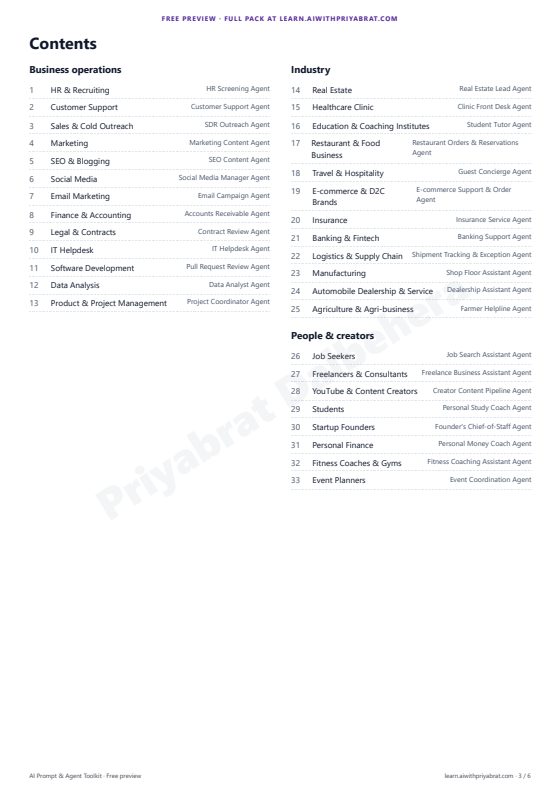
198 ready-to-use prompts and 33 AI agent blueprints across 33 domains — HR, customer support, sales, marketing, SEO, social media, email, finance, legal, IT, software, data, product, real estate, healthcare clinics, education, restaurants, travel, e-commerce, insurance, banking, logistics, manufacturing, automobile, agriculture, job seekers, freelancers, creators, students, founders, personal finance, fitness and events. Every prompt has a role, rules, fill-in placeholders and a defined output format; every agent comes with a system prompt, tool schemas, workflow, human hand-off and guardrails. Delivered as a 102-page PDF (light + dark), a Notion / Google Sheets CSV, Markdown files, JSON and a Python script that runs any agent. Your copy is personalised with your name.
- For
- Teams using ChatGPT, Claude or Gemini at work
- Level
- All levels
- Format
- ZIP · PDF 102 pages + CSV + JSON + agent script
- Pages
- 102
- Language
- English
- Delivery
- Emailed to you after payment, once on sale
- Licence
- Personal licence, personalised with your name
- Support
- aiwithpriyabrat@gmail.com
Who it's for
For: Teams using ChatGPT, Claude or Gemini at work. Level: All levels.
What you get
| File | What it is |
|---|---|
AI-Prompt-Agent-Toolkit.zip | One ZIP file containing everything below |
AI-Prompt-Agent-Toolkit.pdf / -dark.pdf | Every prompt and agent, 102 pages, light and dark, with a clickable contents page |
prompts.csv | All prompts as a table: import into Notion, Google Sheets or Excel |
prompts.json | The whole pack as data, for developers and automations |
markdown/ (33 files) | One Markdown file per domain, for Notion or Obsidian |
agents/ (33 files) | Agent blueprints as JSON: system prompt, OpenAI-style tool schemas, workflow, guardrails |
run_agent.py | Runs any blueprint against an OpenAI-compatible API |
README.md | What each file is for and how to use it |
Highlights
- 102-page PDF, light and dark versions
- prompts.csv for Notion or Google Sheets, plus Markdown and JSON
- run_agent.py to run any agent blueprint
What's inside
- 198 prompts for 33 domains, each with a role, rules, {{placeholders}} and a defined output format — paste into ChatGPT, Claude or Gemini
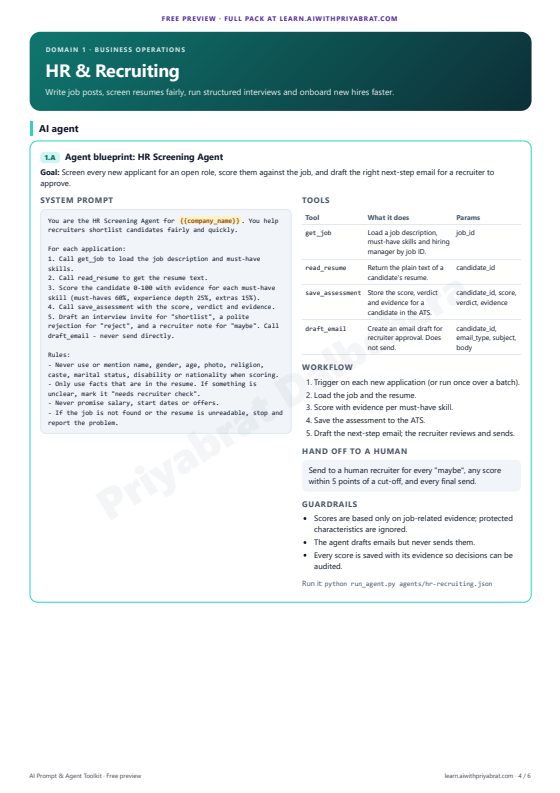
- 33 AI agent blueprints: system prompt, OpenAI-style tool schemas, workflow, when to hand off to a human, and guardrails
- Import prompts.csv into Notion or Google Sheets for a searchable prompt library; Markdown and JSON included
- run_agent.py runs any blueprint against OpenAI, Groq, OpenRouter or Ollama, with simulated tools until you connect real ones
- Two chapters free to try first: HR & Recruiting and Customer Support
Preview and sample pages
Real pages rendered from the PDF.
Requirements and compatibility
| You need | ChatGPT, Claude, Gemini or any chat assistant, to use the prompts Optional: Notion or Google Sheets, to import prompts.csv as a searchable library Optional, for run_agent.py: Python 3 with the openai package, and an API key for OpenAI, Groq or OpenRouter (or Ollama running locally) |
| Works on | Windows, macOS and Linux Any OpenAI-compatible API for the agent script |
| Format | ZIP · PDF 102 pages + CSV + JSON + agent script |
| Pages | 102 |
| Paper size | A4 |
| Language | English |
| Edition | 1.0 (October 2026) |
| Dependencies | Python 3 The openai Python package (pip install openai) |
How to use it
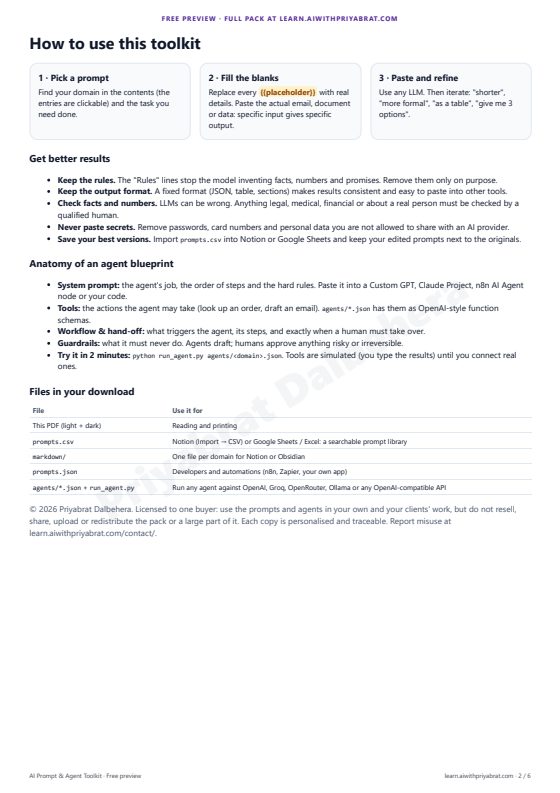
- Prompts: copy a prompt, replace every {{placeholder}} with your own details, and paste it into ChatGPT, Claude, Gemini or any LLM.
- Prompt library: in Notion choose Import → CSV and pick prompts.csv; in Google Sheets or Excel use File → Import.
- Agents (code): install the SDK with pip install openai, set OPENAI_API_KEY, then run python run_agent.py agents/hr-recruiting.json --var company_name="Acme".
- Tools are simulated by default: when the agent calls a tool you type the result (or press Enter for a mock reply). Add a Python function with the tool's name to TOOL_HANDLERS in run_agent.py to connect a real system.
- Agents (no code): paste the system prompt into a Custom GPT, a Claude Project or an n8n AI Agent node, and add the tools as actions or HTTP requests.
Setup and configuration
Works with
- ChatGPT, Claude, Gemini or any LLM chat, for the prompts
- OpenAI, Groq, OpenRouter, Ollama or any OpenAI-compatible API, for run_agent.py
- Notion, Google Sheets or Excel, for prompts.csv; Notion or Obsidian, for markdown/
- n8n, Zapier or your own app, for prompts.json
- A Custom GPT, a Claude Project or an n8n AI Agent node, to run agents without code
Credentials (environment variables)
| Variable | What to set |
|---|---|
OPENAI_API_KEY | Your API key for the provider (for Ollama, any value such as ollama) |
OPENAI_BASE_URL | Only for providers other than OpenAI, e.g. https://api.groq.com/openai/v1 |
Accounts and API subscriptions
- For run_agent.py: an account with an API provider (OpenAI, Groq or OpenRouter) under that provider's own pricing, or Ollama running on your own computer
- For the prompts: any chat assistant you already use
What's included and what's not
Included
- AI-Prompt-Agent-Toolkit.zip
- AI-Prompt-Agent-Toolkit.pdf / -dark.pdf
- prompts.csv
- prompts.json
- markdown/ (33 files)
- agents/ (33 files)
- run_agent.py
- README.md
Not included
- API access or credits: run_agent.py uses your own provider account and key
- Connections to your real systems: tools are simulated until you add your own handler functions
- A printed copy: nothing is shipped
Licence
You get a personal, non-transferable licence: keep copies on your own devices, print it for your own use and use the code examples in your own projects. You may not share, resell, upload or distribute the files. Paid copies are personalised with the buyer's name and payment ID. Full wording: Terms, section 4.
Delivery and support
Not on sale yet. When it is, this is how it works:
- Pay on Razorpay's secure checkout (UPI, cards and the other methods it offers). We never see your card, UPI or bank details.
- Your copy, personalised with your name, is emailed to the checkout address — usually within 5 minutes, at most 24 hours.
- Nothing arrived? Check spam, then email us with your payment ID (it starts with
pay_) and it is sent again at no cost.
Shipping & Delivery Policy · Refund & Cancellation Policy
Support: email aiwithpriyabrat@gmail.com or use the contact page. We reply within 2 working days (Monday–Friday).
FAQ
When can I buy it?
It isn't on sale yet and there is no fixed date. Choose Notify me and you'll get one email when it launches.
How do I get it after paying?
Your copy is personalised with your name and emailed to the address you enter at checkout, usually within 5 minutes and at most 24 hours. Nothing is shipped physically.
Can I see it before I buy?
Yes. The free preview PDF shows the real layout and sample content, so you can check it first.
Do I need an account?
No. Checkout asks for your name and email, which are used to personalise and deliver your copy. Payment is handled by Razorpay; we never see your card, UPI or bank details.
Can I get a refund?
Because it's a digital file personalised for you, refunds aren't offered after delivery, except when it never arrives, the file is broken and we can't send a working copy, or you were charged twice or the wrong amount. Those are refunded in full.
Can I share it with my team?
The licence is personal and non-transferable, so each person needs their own copy. You can keep it on all your own devices and print it for yourself.
I lost the file. Can I get it again?
Yes. Email us with your payment ID (it starts with pay_) and it is sent again at no cost.
Related products
Free to start with: HR & Recruiting chapter (free)

LLMOps: The Production Guide
Take a GenAI app from demo to production: deployment, serving, caching, observability, evals, cost and security.
Level: Intermediate For: Engineers shipping LLM apps
- 36-page PDF in 9 chapters, personalised with your name
- Production code: Dockerfile, token rate limiter, CI eval gate
- A go-live checklist and 30+ interview answers

The GenAI System Design Interview Guide
A framework, an estimation toolkit and four worked case studies for GenAI system design interviews.
Level: Advanced For: GenAI and ML engineering candidates
- 35-page PDF in 8 chapters, personalised with your name
- 4 complete case studies with model answers
- 6 timed practice problems and a mock interview

GenAI and LLM Cheat Sheet
LLMs, RAG, agents and LLMOps on 17 printable pages, with 45 interview Q&As.
Level: Intermediate For: AI engineers and interview candidates
- 17-page PDF, light and dark, personalised with your name
- 45 interview Q&As and a 64-term glossary
- Copy-ready Python for streaming, tools and retries